


2026-09-16
Soundpad Update 4.0.35
한글 요약이 품질 관문에 걸려 원문만 둡니다.

| 기간 | 할인율 | 그때 가격 / 정가 | |
|---|---|---|---|
| 2026.06.25 ~ 2026.07.09 | -20% | 4,480원 | 역대 최대이력 |
| 2026.03.19 ~ 2026.03.26 | -20% | 4,480원 | 역대 최대이력 |
| 2025.12.18 ~ 2026.01.05 | -20% | 4,480원 | 역대 최대이력 |
| 2025.09.29 ~ 2025.10.06 | -20% | 4,480원 | 역대 최대이력 |
| 2025.06.27 ~ 2025.07.10 | -20% | 4,480원 | 역대 최대이력 |
| 2025.03.13 ~ 2025.03.20 | -20% | 4,480원 | 역대 최대이력 |
| 2024.12.20 ~ 2025.01.02 | -20% | 4,480원 | 역대 최대이력 |
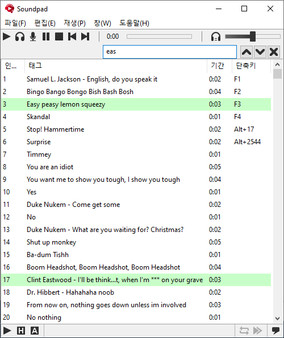
고품질로 음성 채팅에서 사운드를 재생하세요. 지금 무료 데모를 이용해 보세요!
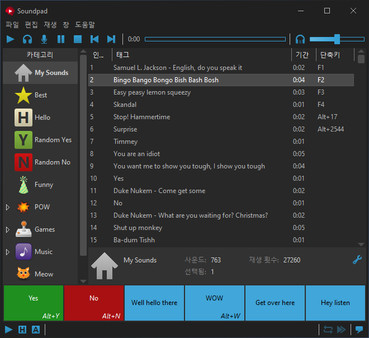
아마도, 인기 있는 Duke Nukem 사운드처럼 사람들이 함께 소리를 내는 사운드보드에 대해 들어보셨을 것입니다. Soundpad를 사용하면 자신뿐만 아니라 다른 사람들에게도 사운드를 재생할 수 있습니다.
기능· 음성 채팅에서 사운드 재생
Teamspeak, Mumble, Skype, Discord나 Dota2, CS:GO 또는 PUBG 같은 음성 관련 애플리케이션에서 작동합니다.
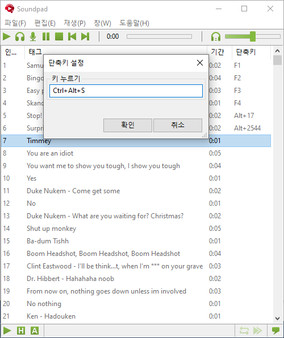
· 단축키
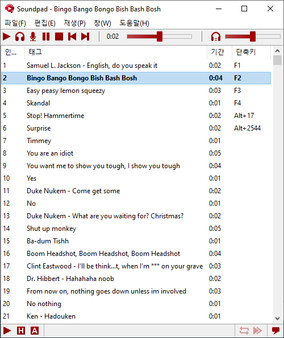
각 사운드 파일마다 단축키를 설정하고 인게임 중에 빠르게 재생하세요.
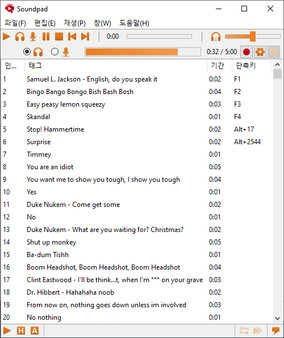
· 사운드 레코더 및 편집기
Soundpad에는 사운드 레코더가 내장되어 있어, 사용자가 들리는 내용을 녹음할 수 있습니다. 통합 편집기를 사용하면 사운드를 빠르게 자를 수 있습니다.
· 볼륨 정규화
일부 사운드 파일은 조용하지만 다른 파일은 너무 소리가 큰가요? 통합된 볼륨 정규화는 볼륨을 균일하게 하므로, 음성 볼륨을 알맞게 들려줍니다.
· 간편한 설치
Soundpad는 추가 장치 설치 없이, 기본 녹음 장치(마이크가 가장 일반적)를 확장합니다.
· 지원되는 파일 형식
aac, flac, m4a, mp3, ogg, opus, wav, wma
데모를 확인하고 개별 사운드 수집을 시작하세요!
한글 요약이 품질 관문에 걸려 원문만 둡니다.
한글 요약이 품질 관문에 걸려 원문만 둡니다.
- Fixed audio ducking being triggered permanently in Windows and not only when sounds are played. - Fixed issue preventing Windows from going into hibernation because of an active audio line. That option has to be turned off to have it work: File -> Preferences -> Interface -> Toolbar -> Display microphone level on toolbar. - Fixed compatibility issue with Logitech's G Pro X headsets. The original driver's Blue VO!CE broadcast filters weren't loaded after a system restart.
스팀 공지한글 요약이 품질 관문에 걸려 원문만 둡니다.
The changes include: - Rolled back to previously used Steam SDK 1.59, because Soundpad couldn't be launched from outdated Steam Clients.
스팀 공지한글 요약이 품질 관문에 걸려 원문만 둡니다.
The changes include: Compatibility - Now also supporting ARM processors. - Fixed compatibility issue on Windows 11 systems after cumulative Windows update KB5065426. That update introduced Voice Clarity and other audio enhancements, that are incompatible with Soundpad. - Fixed rare compatibility issue, where a connection to the driver extension wouldn't be established, because the setup check routine couldn't verify if the driver extension was registered properly. - Fixed compatibility issue with Logitech's Blue Yeti microphones. The original driver's effects weren't loaded after a system restart. User interface - Added the Auto stop option to the play menu. That option is enabled by default and could previously only be found in the advanced hotkey options. - About dialog: The license information in the standalone version is now hidden behind a button. It's for streamers to avoid revealing their email address while streaming. - Added confirmation dialog when removing dead entries. - Added Refresh button to the device preferences. Misc - Improved random playback algorithm to have a better distribution and less noticeable repetitions. - The voice activat
스팀 공지사용도 편하고 성능도 준수해서 만족합니당.
친구들이랑 디스코드할때 디스코드 사운드보드를 쓸 수 있잖아요 가끔 이 사운드보드에 별 개같은걸 넣어서 친구에게 별의 별 소리를 선사하고 싶은 충동이 들 때가 있어요 근데 듣는 입장에서는 "이 사용자의 사운드보드 끄기" 같은 디코옵션을 써버리면 이러한 나의 노력은 무용지믈이 되는거지요 그때 이거 쓰면 됩니다 내 마이크로 개같은 소리를 선사함으로써 자기주장을 확실히 펼치는거에요
쓸만함
다재다능한 유용한 사운드 패드 단점이 있다면 소리 조절이 힘들다
 -95%
-95% -95%
-95% -95%
-95% -94%
-94% -20%
-20% -20%
-20% -20%
-20% -20%
-20% -20%
-20% -20%
-20% -20%
-20% -20%
-20%

