

2026-08-28
v0.5.22 Patch: Keep the Fight in View—Aim Your Bow on the Move!
한글 요약이 품질 관문에 걸려 원문만 둡니다.
원문 보기
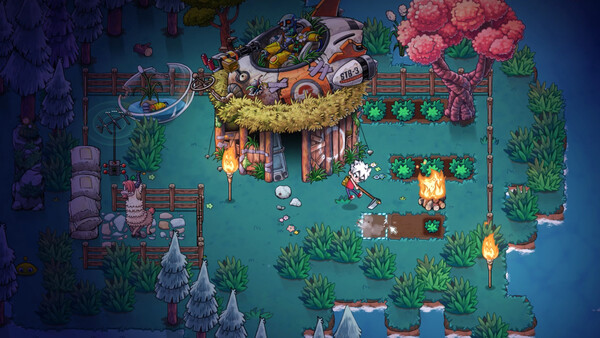
Hello, everyone! It has been a little longer than usual since our last update. We have been hard at work on a development branch that separates character data from world save data. That work is still in progress. In the meantime, here is everything already completed and included in this patch:More Refined Character Occlusion HandlingORANGE noted in their review that occlusion handling has a direct impact on combat readability in a 2D game. When buildings obscure the player character or enemies, players may be forced to continue fighting without a clear view of their target.This patch specifically improves how the player character is displayed when obscured.Expanded Occlusion CoverageMore static buildings and resources—including NPC houses and large ruins—will now apply the selected occlusion effect when they block the player character.Customizable Display EffectsThree effects and an option to disable the feature are available in the game settings:Fade Entire Obstructing ObjectsFade Obstructions Around CharactersShow Character OutlinesNo EffectA Small NoteWhen using either fade mode, buildings that have not yet been unlocked will remain opaque. After all, discovering what is inside
스팀 공지2026-08-20
v0.5.21.2303 Hotfix | Gamepad Portal Targeting & Map Sync Stability
한글 요약이 품질 관문에 걸려 원문만 둡니다.
원문 보기
Hello everyone! This update targets a common controller and Steam Deck pain point: lining up a Portal on the map. The selection frame is larger, nearby Portals snap into focus, and analog map panning now supports fine input, sustained acceleration, and quicker braking. We also fixed a serious Map Sync Station stall that could disconnect other players.More Precise Portal Targeting on GamepadPreviously, selecting a Portal with a controller or Steam Deck often required repeated, pixel-perfect adjustments. Three changes make that process easier:Larger selection frame. Your current aim point is easier to read at a glance. (HYM-11-11)Portal snap targeting. Move near an available Portal and the map will center on it and highlight the icon—no more pixel hunting to select it. (taichunmin)Analog acceleration and braking. Light stick input gives you fine control; hold a direction to build speed across the map; release to stop quickly.Other FixesFixed a serious issue where a Steam Deck host could stall for around 20 seconds while loading map data or uploading through the Map Sync Station, disconnecting other players. (taichunmin)Fixed an issue where teleporting directly to a camp that requires
스팀 공지2026-08-19
v0.5.21 Hotfix | Stronger Save Protection & Bug Fixes
한글 요약이 품질 관문에 걸려 원문만 둡니다.
원문 보기
Hello everyone! The most important part of this update is stronger save protection. We have also fixed several issues recently reported by the community.Stronger Save ProtectionIf saving is unexpectedly interrupted or a file becomes corrupted, the game will do its best to preserve the last usable copy and reduce the risk of lost progress.Improved recovery when unexpected errors occur while saves are being written or replaced.Each time you successfully enter a world, the game will automatically keep a backup snapshot that can be used for manual recovery in extreme cases.Thank you to 菻菻 and Lonely for patiently sharing their experiences with us after encountering this issue. We will continue monitoring how these changes perform after the update.Other FixesFixed an issue that could occasionally leave your character unable to move after using a Portal. (taichunmin, 麻麻辣辣爆炒章鱼, and many other players)Fixed an issue in multiplayer where nearby chests could remain marked “In Use” after upgrading a workstation. (Tattoo)Corrected a typo in the Japanese name of Spirit Training Shoes. (モモさんゲームス)Names in parentheses are players who reported the issue or helped us resolve it. If you encounter any
스팀 공지2026-08-17
v0.5.20 Hotfix | Map Pause & Bug Fixes
한글 요약이 품질 관문에 걸려 원문만 둡니다.
원문 보기
Hello everyone! This update improves pausing in single-player and fixes a multiplayer issue where creatures carried by the Wolf Rabbit could be duplicated or disappear unexpectedly.Pause While Viewing the Map, Talents, and GuideWhen “Pause In Bag/Map/Talent/Guide (Single Player Only)” is enabled, opening the Map, Talent, or Guide screen will now pause the game. You no longer need to worry about being attacked in the background while checking your route, adjusting Talents, or reading the Guide.You can still pan and zoom the map normally while the game is paused.We’ve also received requests to pause the game during dialogue. This feature is not included in this update, but we’ve recorded the request and will continue exploring a suitable implementation.Other FixesFixed a multiplayer issue where creatures carried by the Wolf Rabbit could be duplicated or disappear unexpectedly.Fixed an issue where the boomerangs, Fist Pistol, and Random Gun were not correctly recognized as melee weapons. They now properly benefit from melee damage, melee attack speed, and related on-hit effects, while also granting melee skill experience.Fixed raising a shield sometimes interrupting actions performed
스팀 공지