


2026-09-26
🛠️ Update 1.75 - "Save DIY files" button for controller always visible
- DLC 시 컨트롤러에 "Save DIY files" 버튼 항상 표시
- 게임 내 DIY 저장 기능 접근성 개선
- 사용자 편의성 향상
| 기간 | 할인율 | 그때 가격 / 정가 | |
|---|---|---|---|
| 2026.08.15 ~ 2026.10.04 | -43% | 11,680원 | 역대 최대진행 중관측 |
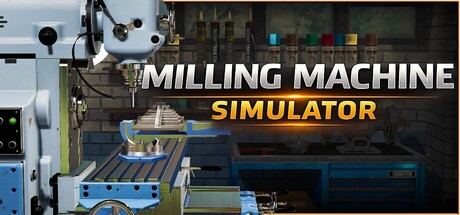
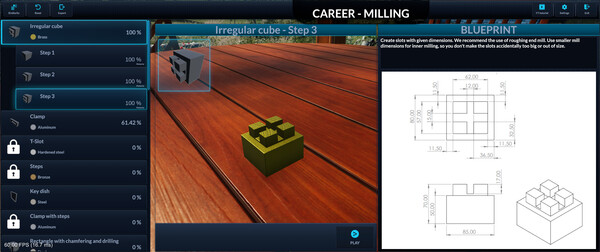
경험해본 적 없는 몰입감으로 밀링의 세계에 빠져들어 보세요.
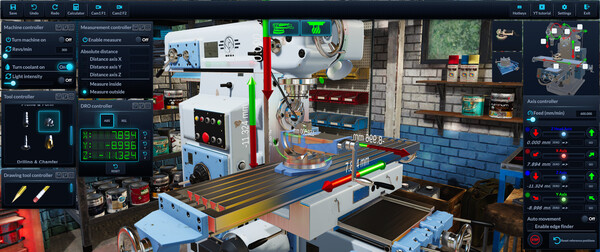
실제 사용되는 밀링 머신으로 드릴, 밀링, 그라인딩 및 절단 작업 등을 해보세요.
직접 만든 청사진을 가져와 무료 밀링 모드에서 고유한 제품의 프로토타입을 만드세요.
커리어 모드에서 정밀하게 측정하고 더 어려운 작업을 완료하세요.
재료와 크기를 선택하여 필요에 맞게 작업 재료를 맞춤 설정하세요.
사실적인 물리학적 작동으로 작업을 진행하세요. 절단 도구가 부러질 수 있다는 것도 유의하세요!


| 0.1% | ContributorUploaded 5 workshop items. |
| 0.1% | ProlificUploaded 10 workshop items. |
| 0.1% | Workshop RegularUploaded 25 workshop items. |
| 0.1% | Workshop MasterUploaded 50 workshop items. |
| 0.1% | Workshop LegendUploaded 100 workshop items. |
| 0.2% | PublishedUploaded a workshop item. |
희귀한 도전과제일수록 조건에 히든보스나 비밀 엔딩이 그대로 적혀 있습니다. 스팀 커뮤니티 실측 달성률이에요.
한글 요약이 품질 관문에 걸려 원문만 둡니다.
The Milling Machine Controller DLC is now available. It is a do-it-yourself kit: you build a physical three-handwheel controller from off-the-shelf parts and use it to drive the X, Y and Z axes of the manual mill. Nothing is shipped; you get the print files, parts list, firmware and a step-by-step guide. A separate announcement with all the details follows. Milling MachinesNew CavTap M10 tool that cuts real internal threads in the workpiece.The manual mill can be jogged with the physical handwheel controller from the new DLC. Lathe MachinesFixed the tool post mounting tools on the wrong side of the plate in some machine positions. All MachinesBetter frame rate thanks to faster rendering of machine parts and the user interface. General and UINew Controller tab in Settings with a switch for the physical handwheel and a live connection status.The Controller tab has a "Save DIY files" button that exports the 3D print files, parts list, firmware and build guide.Fixed a rare crash when a machine control group had no tables assigned.
스팀 공지Milling machines Added a new meshing algorithm - Dual Contouring. It produces sharp corners and smoother curved surfaces on the machined workpiece, where the classic algorithm rounds them off. It is more demanding on the GPU, so you can choose between the two algorithms in the settings. Lathe machines Coolant is now dragged and flung around by the spinning workpiece. Coolant droplets no longer get swallowed by the spinning workpiece and fall through it. The measurement is now hidden while the workpiece is spinning and reappears when the spindle stops. CNC machines A program entered in MDI (Manual Data Input) now stops automatically after its last line, even when the program has no M2/M30 at the end. The program speed multiplier can now also be lowered by right-clicking it; left-clicking still raises it. Typing with multiple lines selected in the G-code editor now replaces the whole selection, instead of writing into the last selected line only. The same applies to pressing Enter over a selection. Undo in the G-code editor now returns the cursor to the correct position. Fixed: resuming a paused program in absolute mode (G90) could send the machine to a wrong position, because the re
스팀 공지All Machines Surface finish quality now depends on feed rate and spindle speed. Improved drawing on the workpiece and optimized the finishing texture. Workpieces are automatically rotated 90 degrees when needed to fit vise and chuck jaws. If a workpiece does not fit the clamp, a separate message explains why. Fixed holes appearing in the workpiece in some cases. Fixed shavings showing up when there was no material to remove. Fixed a freeze when switching clamps while chunks were still queued for remeshing. CNC Milling and CNC Lathe Added macro functions and operators (SIN, COS, SQRT, ABS, arithmetic and logic expressions). Added macro flow control: IF, WHILE and GOTO. Faster G-code parsing, and fixed parsing of bracketed expressions. Fixed negated macro variables (X-#101) being dropped from motion blocks. The tool changer now mounts the active tool from the CNC tools table. Reworked console messages: severity gutter icons, cleaner text and detailed CNC alarm descriptions. G-Code Program Editor Added G-code syntax highlighting in Cimco-style colors. Added autocomplete with parameter signatures while typing. Added undo and redo (Ctrl+Z / Ctrl+Shift+Z / Ctrl+Y). Added Ctrl+A to select
스팀 공지이거 사고 사람들이 바로 하는짓 -> 원점 잡고 G0 Z-1000; 재미있긴 한데 아쉬운 부분도 많다. 가장 큰건 공구의 종류가 아쉽다. 백면취나 스레드밀 45* 이외의 챔퍼툴 등 공구가 많으면 좋겠다 내가 못 찿은건진 모르겠지만 커터류도 안보이더라..
관련 지식있는분만 하는걸 추천 부숴지는걸 원하시면 공구파괴 옵션 키시면 됩니다. 지식이 없으니 하나도 모르겠어서 가지고 놀다 껐습니다.
The developer must be crazy
이런 극한의 마이너에서 현실성을 추구할거면 아얘 가차없는 현실을 때려박아야 더 재미있을 거 같은데 그러질 않음. 평면 가공 공구를 세로로 들이받아도 기계만 띡 하고 멈추고 끝나는데 그리 허무할 수가 없다. 속도도 빠르게 돌리면 스파크튀고 가공물 다 그을리고 기계는 아작나고 쿵 찍으면 5천만원 날아가는 두근두근한 금형의 현실을 제대로 구현해줬으면 했다.
 -95%
-95% -95%
-95% -95%
-95% -95%
-95% -35%
-35% -35%
-35% -35%
-35% -35%
-35% -35%
-35% -35%
-35% -35%
-35% -35%
-35%

